
Frontend State Beyond useState
December 19, 2025
At work I often encounter frontend state management that is overly complex and error-prone. Some examples:
- Fetching some data from the server, then maintaining a copy of that data in a global store like Redux
- Manually managing form state with React’s useState hook
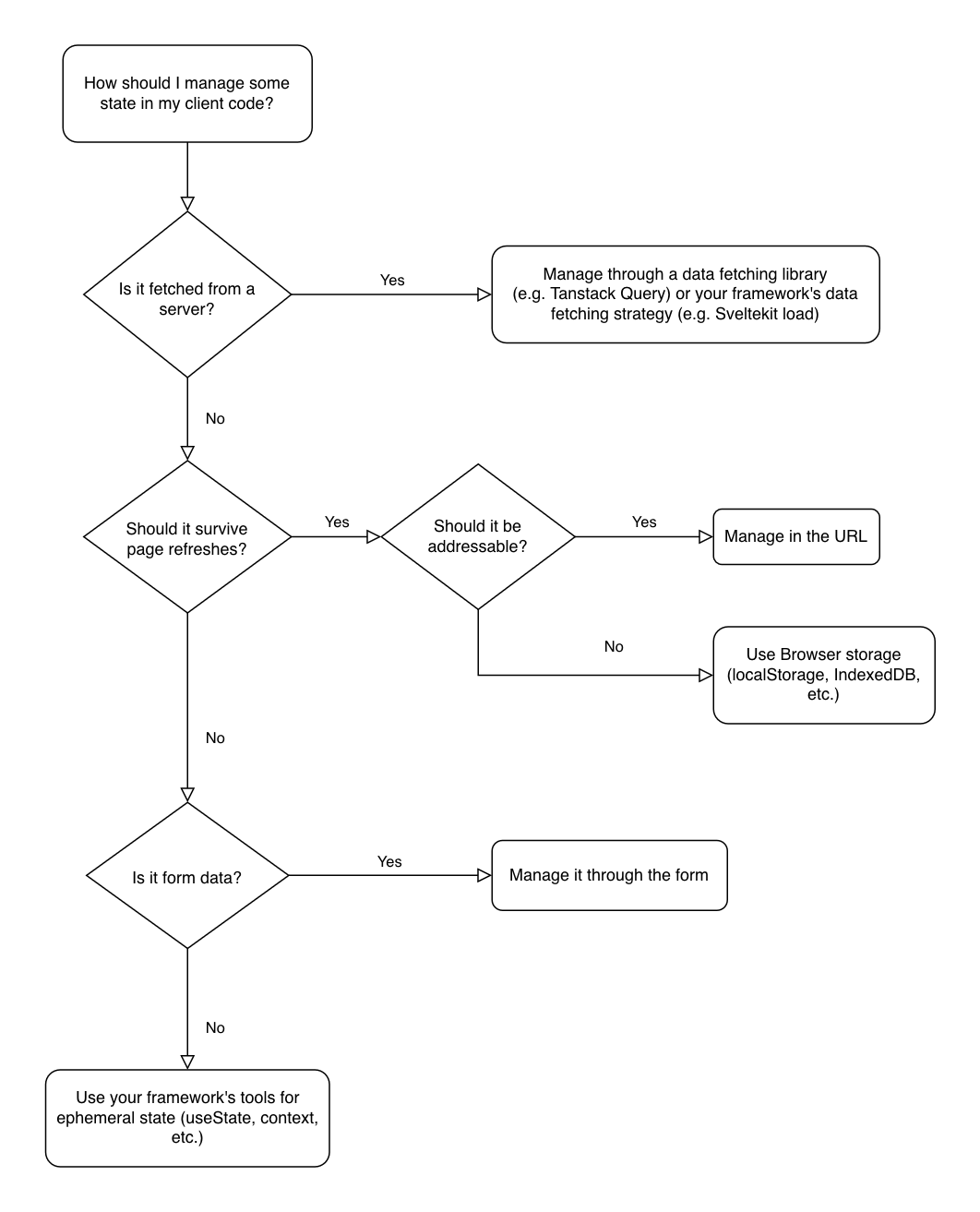
Sometimes, state is used when URL search params should be used instead. In modern frontend programming, there is usually a right and wrong way to manage some state, depending on its purpose and qualities. This flow chart should be helpful when making a decision about how to manage some frontend state:
Server Data
Modern javascript frameworks come with data fetching solutions. For example, SvelteKit load. For a stand-alone library, I like Tanstack Query, which manages fetching, deduplication, invalidation, and more. There is absolutely no reason for you to be managing server data manually on the client, you will save yourself many headaches by using a framework or a data fetching library.
What is addressability
Web pages are accessed using Universal Resource Locators, or URLs.1 As implied by the name, the URL points to a specific resource provided by your website. In other words, it is an address: a way to communicate about where something is. When deciding if some state should be addressable, ask yourself: Should this state persist if I bookmark this page for later? Or if I share the link to this page with a friend? For example, consider a page that shows a list or grid of similar items, where the user can filter the items based on certain qualities. Frontend developers often use state to store filter selections, but using the URL’s search parameters is preferable for addressability. Imagine an ecommerce site that sells fruit. A URL for this site might look like: example.com/shop/apples?colour=red. If I share this link with my friend, they will know I meant to show them red apples. Other examples of state that should be addressable include:
- Pagination
- Search queries
- Addressing a specific tab or part of a page. Wikipedia does this well. E.g.
https://en.wikipedia.org/wiki/Uniform_Resource_Identifier#Syntax, this link specifically addresses the section about URL syntax. - Linking to a form with some data pre-filled (e.g.
foo.com/register?country=CAN) - Selections (e.g.
inbox?selected=msg_456)
Other benefits of addressability:
- Browser back/forward buttons work as expected
- Search engines can index filtered pages
- Analytics can track which filters users actually use
Avoid putting sensitive data in URLs. URLs will end up in the user’s browser history, and in your logs.
Form Data
Similar to server data, modern frameworks have idiomatic solutions for form management. If you aren’t using a framework, use a form library like react-hook-form. Managing form state manually is likely to result in overly verbose code, while using a library or framework will result in more declarative, readable code. These tools will also help you to follow best practices for semantic HTML.
When to use Forms
<form> should be used when your user needs to submit input. Often, this means they are mutating some data. For example, to allow a user to update their address, you would show them an address form. Most websites use forms for search inputs. While you should consider using a form any time a user is entering input into your website, you might not be able to use forms in all cases. For example, a rich text editor like an email composer might be awkward to implement as a form. In general, a form should be the first tool of choice for collecting user input.2
1. I know URL officially stands for uniform resource locator, but "universal" works better for the point.